
I just had a hard time figuring out that a network routing setup was not working due to a correctly enforced IP Spoofing protection on a Palo Alto Networks firewall. Why was it a hard time? Because I did not catch that the IP spoofing protection kicked in since there were no logs. And since we do log *everything*, a non-existent log means nothing happened, right? Uhm, not in this case. Luckily, you can (SHOULD!) enable an additional thread log on the Palo firewall.
The exception proves the rule. That is: blocks/drops that are enforced with these options are NOT logged in any way within the GUI:
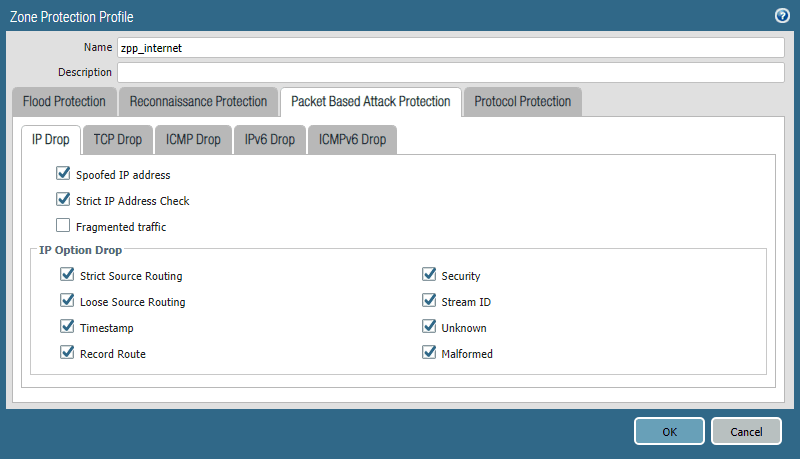
The only way to find some drops, e.g., spoofed IP addresses (aka unicast reverse path forwarding), was the global counters along with an appropriate packet filter (from the GUI at Monitor -> Packet Capture):
|
1 2 |
weberjoh@pa(active)> show counter global filter packet-filter yes | match spoof flow_dos_pf_ipspoof 1908 0 drop flow dos Packets dropped: Zone protection option 'discard-ip-spoof' |

Investigating IP Drops (amongst others)
With PAN-OS 8.1.2, Palo Alto Networks released a new feature: “Logging of Packet-Based Attack Protection Events“. With this feature, all (?) protections are logged in the threat log, which is accessible through the GUI.
|
1 |
set system setting additional-threat-log on |
- It does not require a commit -> it is live instantly.
- It is persistent, that is, it survives a reboot of the firewall.
- It is NOT part of the configuration file -> if you’re doing an RMA or a tech refresh, you have to set it again!
- It is NOT synced within an HA cluster -> you have to enable it on every member of your HA cluster!
- You can verify whether or not this logging feature is enabled with the following command: show system state filter cfg.general.additional-threat-log
However, please enable it carefully to not overwhelm your logs. ;)
This is how I’ve done it on one of my firewalls. Checked it, enabled it, checked it again:
|
1 2 3 4 5 6 7 8 9 10 11 12 13 14 15 |
weberjoh@pa(passive)> show system state filter cfg.general.additional-threat-log 'cfg.general.additional-threat-log': NO_MATCHES weberjoh@pa(passive)> weberjoh@pa(passive)> weberjoh@pa(passive)> set system setting additional-threat-log on weberjoh@pa(passive)> weberjoh@pa(passive)> weberjoh@pa(passive)> show system state filter cfg.general.additional-threat-log cfg.general.additional-threat-log: True weberjoh@pa(passive)> |
And this is what the protection against IP spoofs looks like in the threat log:
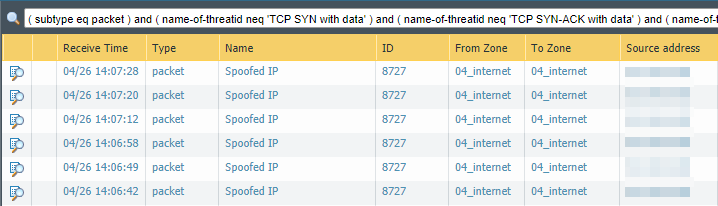
By the way: Google pointed me to the solution on Reddit respectively Palo Alto’s LIVEcommunity. Meanwhile, I was confused by a new feature from PAN in a non .0 PAN-OS version. Anyway, some more feature requests to Palo Alto Networks:
- Feature request #1: enabling/disabling this feature through the GUI just like any other feature.
- Feature request #2: adding a big sign at the zone protection profile about these probably not logged blocks.
[Update] show zone-protection
I was not aware of this command. You can issue a show zone-protection zone <NAME> CLI command in order to get block counters for any option, tracked per zone. Example:
|
1 2 3 4 5 6 7 8 9 10 11 12 13 14 15 16 17 18 19 20 21 22 23 24 25 26 27 28 29 30 31 32 33 34 35 36 37 38 39 40 41 42 43 44 45 46 47 48 49 50 51 52 53 54 55 56 57 58 59 60 61 62 63 64 65 66 67 68 69 70 71 72 73 74 75 |
weberjoh@pa-home> show zone-protection zone Internet ------------------------------------------------------------------------------------------ Number of zones with protection profile: 1 ------------------------------------------------------------------------------------------ Zone Internet, vsys vsys1, profile untrust ------------------------------------------------------------------------------------------ tcp-syn RED enabled: yes DP alarm rate: 10000 cps, activate rate: 10000 cps, maximal rate: 40000 cps current: 180 packets dropped: 153732 packets ------------------------------------------------------------------------------------------ udp RED enabled: yes DP alarm rate: 10000 cps, activate rate: 10000 cps, maximal rate: 40000 cps current: 14 packets dropped: 224 packets ------------------------------------------------------------------------------------------ icmp RED enabled: yes DP alarm rate: 10000 cps, activate rate: 10000 cps, maximal rate: 40000 cps current: 0 packets dropped: 0 packets ------------------------------------------------------------------------------------------ other-ip RED enabled: yes DP alarm rate: 10000 cps, activate rate: 10000 cps, maximal rate: 40000 cps current: 0 packets dropped: 0 packets ------------------------------------------------------------------------------------------ icmpv6 RED enabled: yes DP alarm rate: 10000 cps, activate rate: 10000 cps, maximal rate: 40000 cps current: 0 packets dropped: 0 packets ------------------------------------------------------------------------------------------ IPv(4/6) Filter: discard-ip-spoof: enabled: yes, packet dropped: 0 discard-ip-frag: enabled: yes, packet dropped: 0 tcp-reject-non-syn: enabled: yes, (global), packet dropped: 131 discard-tcp-syn-with-data: enabled: yes, packet dropped: 0 discard-tcp-synack-with-data: enabled: yes, packet dropped: 0 IPv4 packet filter: discard-icmp-ping-zero-id: enabled: yes, packet dropped: 11 discard-icmp-frag: enabled: yes, packet dropped: 0 discard-icmp-large-packet: enabled: yes, packet dropped: 204 suppress-icmp-needfrag: enabled: yes, packet dropped: 1352 discard-strict-source-routing: enabled: yes, packet dropped: 0 discard-loose-source-routing: enabled: yes, packet dropped: 0 discard-timestamp: enabled: yes, packet dropped: 0 discard-record-route: enabled: yes, packet dropped: 0 discard-security: enabled: yes, packet dropped: 0 discard-stream-id: enabled: yes, packet dropped: 0 discard-unknown-option: enabled: yes, packet dropped: 0 discard-malformed-option: enabled: yes, packet dropped: 0 discard-overlapping-tcp-segment-mismatch: enabled: yes, packet dropped: 0 strict-ip-check: enabled: yes, packet dropped: 6 discard-tcp-split-handshake: enabled: yes, packet dropped: 0 IPv6 packet filter: routing-header-0: enabled: yes, packet dropped: 0 routing-header-1: enabled: yes, packet dropped: 0 routing-header-3: enabled: yes, packet dropped: 0 routing-header-4-252: enabled: yes, packet dropped: 0 routing-header-253: enabled: yes, packet dropped: 0 routing-header-254: enabled: yes, packet dropped: 0 routing-header-255: enabled: yes, packet dropped: 0 ipv4-compatible-address: enabled: yes, packet dropped: 0 anycast-source: enabled: yes, packet dropped: 1890 options-invalid-ipv6-discard: enabled: yes, packet dropped: 0 icmpv6-too-big-small-mtu-discard: enabled: yes, packet dropped: 0 needless-fragment-hdr: enabled: yes, packet dropped: 0 reserved-field-set-discard: enabled: yes, packet dropped: 0 hop-by-hop-hdr: enabled: yes, packet dropped: 75 routing-hdr: enabled: yes, packet dropped: 0 dest-option-hdr: enabled: yes, packet dropped: 0 redirect: enabled: yes pkt-too-big: enabled: yes param-problem: enabled: yes ------------------------------------------------------------------------------------------ |
Photo by Lucas Alexander on Unsplash.


Thanks a lot for this one. This will be helpful!
These kind of systems settings should be part of the configuration as well, or at least saved in the device state export. FR#3?