Category Archives: IPv6

Well, this is simply IPv6 stuff. Either network and/or security related.

Telekom Dual-Stack Verbindungsaufbau

Bis neulich hatte ich einen normalen DSL-Anschluss von 1&1: Per PPPoE eingewählt und eine IPv4-Adresse bekommen – fertig. Das kann neben der FRITZ!Box natürlich auch jeder vernünftige Router oder Firewall.

Jetzt habe ich endlich einen richtigen Dual-Stack (IPv4 und IPv6) Anschluss der Telekom (Glasfaser “MagentaZuhause M” ohne Fernsehen, siehe hier). Juchu! ;) Bevor ich jedoch den mitgelieferten Speedport durch diverse andere Testgeräte ersetze, wollte ich mal vernünftig mitschneiden, welche Protokolle denn bei einem Verbindungsaufbau genau eingesetzt werden. Vor allem die Prefix Delegation über DHCPv6 interessierte mich…


Continue reading Telekom Dual-Stack Verbindungsaufbau →

Basic IPv6 Messages: Wireshark Capture

When explaining IPv6 I am always showing a few Wireshark screenshots to give a feeling on how IPv6 looks like. Basically, the stateless autoconfiguration feature (SLAAC), DHCPv6, Neighbor Discovery, and a simple ping should be seen/understood by any network administrator before using the new protocol.

Therefore I captured the basic IPv6 autoconfiguration with a Knoppix Linux behind a Telekom Speedport router (German ISP, dual-stack) and publish this capture file here. I am using this capture to explain the basic IPv6 features.

Continue reading Basic IPv6 Messages: Wireshark Capture →

Ping Times/Latency: DSL vs. Glasfaser, IPv4 vs. IPv6

Seit wenigen Tagen bin ich glücklicher Kunde eines Telekom Glasfaseranschlusses. Mit satten 50/10 MBit/s rasen die Daten bei mir ein und aus. Neben der deutlich höheren Geschwindigkeit war ich aber auch an den Latenzen der beiden Anschlüsse interessiert und habe entsprechende Tests gemacht. Hier kommen die Ergebnisse.

Continue reading Ping Times/Latency: DSL vs. Glasfaser, IPv4 vs. IPv6 →

IPv6 through IPv4 VPN Tunnel with Juniper SSGs

The most common transition method for IPv6 (that is: how to enable IPv6 on a network that does not have a native IPv6 connection to the Internet) is a “6in4” tunnel. Even other tunneling methods such as Teredo or SixXS are found on different literatures. However, another method that is not often explained is to tunnel the IPv6 packets through a VPN connection. For example, if the main office has a native IPv6 connection to the Internet, as well as VPN connections to its remote offices, it is easy to bring IPv6 subnets to these stations.

Here is how I did it with some Juniper SSG firewalls:

Continue reading IPv6 through IPv4 VPN Tunnel with Juniper SSGs →

Firewall IPv6 Capabilities: Cisco, Forti, Juniper, Palo

Since IPv6 gets more and more important, I am using it by default on all my test firewalls, which of course support IPv6. However, when comparing the different functions and administration capabilities, they vary significantly.

Here comes my short evaluation of the IPv6 functions on the following four firewalls: Cisco ASA, Fortinet FortiGate, Juniper SSG, and Palo Alto.

Continue reading Firewall IPv6 Capabilities: Cisco, Forti, Juniper, Palo →

Idea: IPv6 Dynamic Prefix

For dynamic IPv4 addresses, dynamic DNS services such as Dyn or No-IP are well-known. If an ISP issues a single dynamic IPv4 address every 24 hours (or the like), the router or any other device registers the IPv4 address for a DNS record. With port-forwardings on the router, several services on different clients can be accessed.

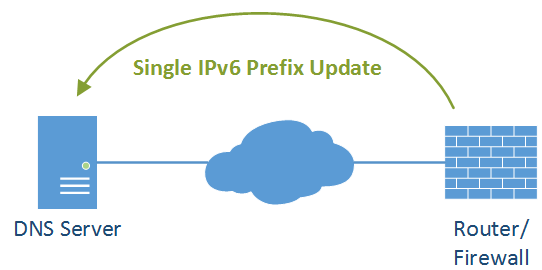
Since there are some ISPs that offer dynamic IPv6 prefixes as well, I have a suggestion on how to optimize the “dynamic DNS” service for several IPv6 addresses and names. The main idea is to update only the IPv6 prefix, while the host IDs are statically configured on the DNS server. This limits the DNS updates and expands the usage of DNS names even for devices that have no “DynDNS update client” built-in.

Continue reading Idea: IPv6 Dynamic Prefix →

“IPv6-Präfixe würfeln” – Was soll das?

Seit Monaten sieht man auf heise online an der rechten Seite den Link zu einem Artikel namens “IPv6-Präfixe würfeln“. Dabei geht es darum, OpenWRT einen Teil des IPv6-Präfixes innerhalb gewisser Zeitspannen würfeln zu lassen, damit normale IPv6-Clients nicht nur die Interface-ID der Adresse per Privacy Extensions regelmäßig ändern, sondern auch die Subnetz-ID. Da diese Idee aber so gar keinen Vorteil für den Datenschutz mit sich bringt, möchte ich hier mal etwas dazu schreiben.

Continue reading “IPv6-Präfixe würfeln” – Was soll das? →

Minor Palo Alto Bug concerning IPv6 MGT

A few months ago I found a small bug in PAN-OS, the operating system from Palo Alto Networks. It is related to an IPv6 enabled management interface. The MGT address was not reachable when the firewall operates in layer 2 mode, that is, had layer 2 interfaces along with VLANs. Luckily, this bug is fixed with the new software version 6.1.2 which was released this week (bug ID 67719).

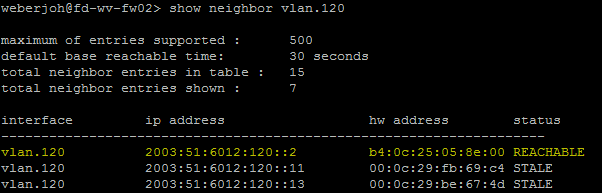
Following are a few listings that show the incomplete handling of the IPv6 neighbor cache of the MGT interface in the old version (pre 6.1.2).

Continue reading Minor Palo Alto Bug concerning IPv6 MGT →

IPv4 vs. IPv6 Traffic Statistics on Routers

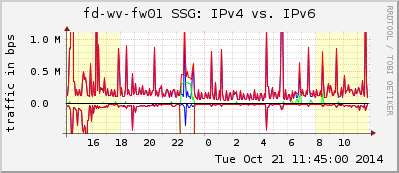
I am very interested in statistics about the usage of IPv6 on Internet routers and firewalls. The problem is, that most routers/firewalls do not have unique SNMP OIDs for IPv4 and IPv6 traffic, but only the normal incoming/outgoing packet counters per interface. Therefore I am using two independent ethernet ports and cables between my outer router and my first firewall, one for IPv4-only and the other one for IPv6-only traffic. Now I have independent statistics for each protocol and can combine them in one summary graph. (Though I know that this will never be a “best practice” solution…)

Continue reading IPv4 vs. IPv6 Traffic Statistics on Routers →

Zugehörigkeit von MAC- und IPv6-Adressen (IPv6-Kongress 2014)

Genau wie letztes Jahr stelle ich hier meinen Vortrag vom diesjährigen IPv6-Kongress in Frankfurt zur Verfügung. Es ist eine PDF-Datei die jeweils meine Folie sowie meine ganzen Stichpunkte beinhält. Somit sollte man den kompletten Inhalt verstehen, auch wenn man nicht beim Vortrag war.

download-buttons02

Continue reading Zugehörigkeit von MAC- und IPv6-Adressen (IPv6-Kongress 2014) →

FileZilla Server Bug: Autoban does not work with IPv6

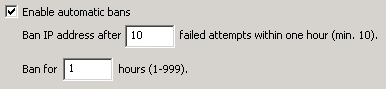
While testing with the new release of Hydra against my own FTP server from FileZilla, I recognized that the autoban feature from FileZilla does not work for IPv6 connections. If there are multiple failed login attempts from an IPv4 address, FileZilla Server correctly blocks that IP. That is: Hydra stops testing passwords since it is not able to connect to the server anymore. However, when using IPv6, the FileZilla server generates the same error message (“421 Temporarily banned for too many failed login attempts”), but new connections from the same IPv6 address are still possible.

Here are my test results:

Continue reading FileZilla Server Bug: Autoban does not work with IPv6 →

IPv6 Address Statistics based on DAD Messages

After my Tcpdump script for storing MAC-IPv6 address bindings via the Duplicate Address Detection messages (link) and an analysis of the realibility of them (here), I had the idea of a Linux script that analyzes the Tcpdump output for obtaining some IPv6 address statistics. It should not show concrete bindings between MAC- and IPv6-addresses, but the number of different kind of IPv6 addresses, such as link-local or global-unicast addresses, built with or without EUI-64, etc.

In the following, I will present my script and will show the results after running it through the DAD logs of a whole month (March 2014) in a BYOD-WLAN with more than 100 clients.

Continue reading IPv6 Address Statistics based on DAD Messages →

Reliability of IPv6 DAD Message Sniffing

A few weeks ago I published an article in which I proposed a method on how to capture the MAC- to IPv6-address bindings via sniffing and storing IPv6 DAD messages. Though any IPv6 node MUST send these Duplicate Address Detection messages prior to assign the address, I was not fully assured that *really* each new IPv6 address is stored with this Tcpdump sniffer.

That is, over a whole month I captured the DAD messages on a test BYOD-LAN and furthermore the complete IPv6 connection logs of the corresponding firewall. At best, I should have any IPv6 address that made an outbound connection through the firewall in the DAD logfiles. Here are the results:

Continue reading Reliability of IPv6 DAD Message Sniffing →

Monitoring MAC-IPv6 Address Bindings

In the legacy IPv4 world, the DHCP server allocates IPv4 addresses and thereby stores the MAC addresses of the clients. In the IPv6 world, if SLAAC (autoconfiguration) is used, no network or security device per se stores the binding between the MAC (layer 2) and the IPv6 (layer 3) addresses from the clients. That is, a subsequent analysis of network behaviour corresponding to concrete IPv6 addresses and their client machines is not possible anymore. The mapping of “identity to IP” is not done automatically somewhere.

A simple way to overcome this issue is to install a service that captures Duplicate Address Detection (DAD) messages from all clients on the subnet to store the bindings of MAC and IPv6 addresses. This can be done with a small Tcpdump script on a dedicated Ethernet interface of a Linux host.

In this blog post I will present a use case for storing these bindings, the concept of the DAD messages, a Tcpdump script for doing this job, and the disadvantages and alternatives of this method.

Continue reading Monitoring MAC-IPv6 Address Bindings →

Cisco AnyConnect: IPv6 Access through IPv4 VPN Tunnel

When travelling to guest Wifis, e.g., at different customers sites, hotels, or public Wifis in general, I often have only IPv4 access to the Internet. Since I do not want to use IPv6 tunnelling protocols such as Teredo, I decided to use the Cisco AnyConnect Secure Mobility Client to tunnel IPv6 between my test laboratory (Cisco ASA) and my computer. With a few changes on the ASA, my computer now gets a private IPv4 address and a global unicast IPv6 address out of my space at home. Since I am using a VPN tunnel to access the Internet from untrusted Wifis anyway, the overall process did not change that much.

In the following, I am showing a few screenshots but not a complete configuration guide for the AnyConnect Client.

Continue reading Cisco AnyConnect: IPv6 Access through IPv4 VPN Tunnel →